Create Claude Code like Agent using Spring AI
Claude Code similar Agent
We all have used cli agent tools similar to claude code.
These agents spawn a process in terminal and based on user's request perform actions like
- read file
- write file
- execute file
- And many others like connecting to internet, database, graphical interface or even hardware interface
Basically llm acts as the decision maker given user's command and using tool_callback we get routed to different tools with necessary argument.
Example if we want to read a file on ubuntu system we execute cat file command.
When asked this same question to llm, llm itself cannot read file instead it relies on tool provided to llm interface.
We need to write mcp tool provide necessary details and attach this tool to llm inference logic such that it can
understand what this tool does and what are the parameter it works with and when to invoke.
Follow this article to read more
Let's create simple spring ai application
Create maven project with spring boot and add following dependencies to it:
 1<dependency>
 2    <groupId>org.springframework.ai</groupId>
 3    <artifactId>spring-ai-starter-model-openai</artifactId>
 4</dependency>
 5
 6<dependency>
 7    <groupId>org.springaicommunity</groupId>
 8    <artifactId>spring-ai-agent-utils</artifactId>
 9</dependency>
10
11<dependency>
12    <groupId>org.springframework.boot</groupId>
13    <artifactId>spring-boot-starter-web</artifactId>
14</dependency>
Configure Spring AI
If you have read my previous article i am mostly focused on LocalLLMs.
Here we will us llama.app's Jackrong/Qwen3.5-9B-Claude-4.6-Opus-Reasoning-Distilled-v2-GGUF:Q4_K_M model.
Since llama.cpp is compatible with open-ai we will use the same.
Following is the application.properties
1spring.application.name=tldr-agent
2spring.ai.openai.base-url=http://server.silentsudo.in:8080
3spring.ai.openai.api-key=llama-cpp-this-can-be-anything-it-is-not-validated
4logging.level.org.springframework.ai=debug
5logging.level.org.springaicommunity.agent.tools.shell=DEBUG
Let's create a bean and configure ChatClient.
For system prompt we are going to store it inside src/main/resource/system.txt
System Prompt
 1You are tldr-agent, a specialized Ubuntu shell command generator and executor.
 2Current working directory: %s
 3
 4### OPERATIONAL RULES
 51. TRANSLATION: Translate requests into precise, idiomatic Ubuntu/Bash commands.
 62. BREVITY: Respond only with the command or a single-sentence explanation followed by the command.
 73. NO CHATTER: Omit greetings, "Here is the command," or conversational filler.
 84. EXECUTION: Execute commands via the provided tools and report the full output.
 9
10### SAFETY & GUARDRAILS
111. SYSTEM PROTECTION: Do not modify core system directories (e.g., /etc, /usr, /lib, /bin).
122. REMOVAL POLICY:
13   - For any command involving deletion or uninstallation (e.g., 'rm', 'rmdir', 'apt purge', 'uninstall'):
14   - STOP and ask: "I need to run [command]. Is this okay?"
15   - Do NOT execute until the user explicitly says "Yes" or "Proceed."
163. OVERWRITE POLICY: If a command will overwrite an existing file, apply the same "STOP and ask" policy.
174. TOOL USAGE: Once confirmed, call executeBash with 'userConfirmedDeletion=true'.
18
19### SEARCH PROTOCOL
20- Technical/Code: github.com, stackoverflow.com.
21- General: google.com.
22
23If the request is ambiguous, ask for one specific clarification instead of guessing.
Building ChatClient
 1package in.silentsudo.tldragent.config;
 2
 3import in.silentsudo.tldragent.tools.GuardedShellTools;
 4import org.springaicommunity.agent.tools.*;
 5import org.springframework.ai.chat.client.ChatClient;
 6import org.springframework.ai.chat.client.advisor.MessageChatMemoryAdvisor;
 7import org.springframework.ai.chat.client.advisor.ToolCallAdvisor;
 8import org.springframework.ai.chat.memory.MessageWindowChatMemory;
 9import org.springframework.context.annotation.Bean;
10import org.springframework.context.annotation.Configuration;
11import org.springframework.core.io.ClassPathResource;
12
13import java.io.IOException;
14import java.nio.charset.Charset;
15
16@Configuration
17public class AIConfig {
18
19    @Bean
20    public ShellTools shellTools() {
21        return ShellTools.builder().build();
22    }
23
24    @Bean
25    public ChatClient chatClient(ChatClient.Builder builder, GuardedShellTools guardedShellTools) throws IOException {
26        String systemMessage = new ClassPathResource("system.txt.bkp").getContentAsString(Charset.forName("utf-8"))
27                .formatted(System.getProperty("user.dir"));
28        System.out.println(systemMessage);
29        return builder
30                .defaultSystem(systemMessage)
31                .defaultTools(
32                        FileSystemTools.builder()
33                                .build(),
34                        GrepTool.builder().build(),
35                        GlobTool.builder().build(),
36                        guardedShellTools,
37                        SmartWebFetchTool.builder(builder.clone().build()).build()
38                )
39                .defaultAdvisors(
40                        ToolCallAdvisor.builder().conversationHistoryEnabled(false).build(),
41                        MessageChatMemoryAdvisor.builder(
42                                MessageWindowChatMemory.builder().maxMessages(128).build()
43                        ).build()
44                )
45                .build();
46    }
47}
Observe that instead of ShellTool we have used GuardedShellTools.
While shell tool can execute command directly without user's interventions we want to double-check before executing dangerous
commands like rm
Code for GuardedShellTools is as below:
 1package in.silentsudo.tldragent.tools;
 2
 3import org.springaicommunity.agent.tools.ShellTools;
 4import org.springframework.ai.tool.annotation.Tool;
 5import org.springframework.stereotype.Service;
 6
 7import java.util.List;
 8
 9@Service
10public class GuardedShellTools {
11
12    private final ShellTools delegate;
13    // List of "Nuclear" commands to block without explicit approval
14    private final List<String> dangerousKeywords = List.of("rm ", "truncate", "dd ", "> /dev/", "mkfs");
15
16    public GuardedShellTools(ShellTools delegate) {
17        this.delegate = delegate;
18    }
19
20    @Tool(description = "Execute bash commands. To delete files, you MUST ask for permission first.")
21    public String executeBash(String command, boolean userConfirmedDeletion) {
22
23        boolean isDangerous = dangerousKeywords.stream().anyMatch(command::contains);
24
25        if (isDangerous && !userConfirmedDeletion) {
26            return "ERROR: This command looks dangerous (contains deletion keywords). " +
27                    "Please ask the user for explicit confirmation before proceeding.";
28        }
29
30        // If safe or confirmed, pass to the real ShellTools
31        return delegate.bash(command, 2000L, command, false);
32    }
33}
To simulate CLI interface we will create InteractiveLoop using CommandLineRunner
Following is the code for InteractiveLoop.java
 1package in.silentsudo.tldragent.commands;
 2
 3import lombok.RequiredArgsConstructor;
 4import org.springframework.ai.chat.client.ChatClient;
 5import org.springframework.boot.CommandLineRunner;
 6import org.springframework.stereotype.Service;
 7
 8import java.util.Scanner;
 9
10
11@Service
12@RequiredArgsConstructor
13public class InteractiveLoop implements CommandLineRunner {
14    private final ChatClient chatClient;
15
16    @Override
17    public void run(String... args) throws Exception {
18        Scanner scanner = new Scanner(System.in);
19        while (true) {
20            System.out.print("\n➤ ");
21            String input = scanner.nextLine();
22
23            if (input.equalsIgnoreCase("exit") || input.equalsIgnoreCase("quit")) {
24                break;
25            }
26
27
28            System.out.print("Thinking...");
29            String response = chatClient.prompt(input).call().content();
30            System.out.println(response);
31        }
32    }
33}
Output
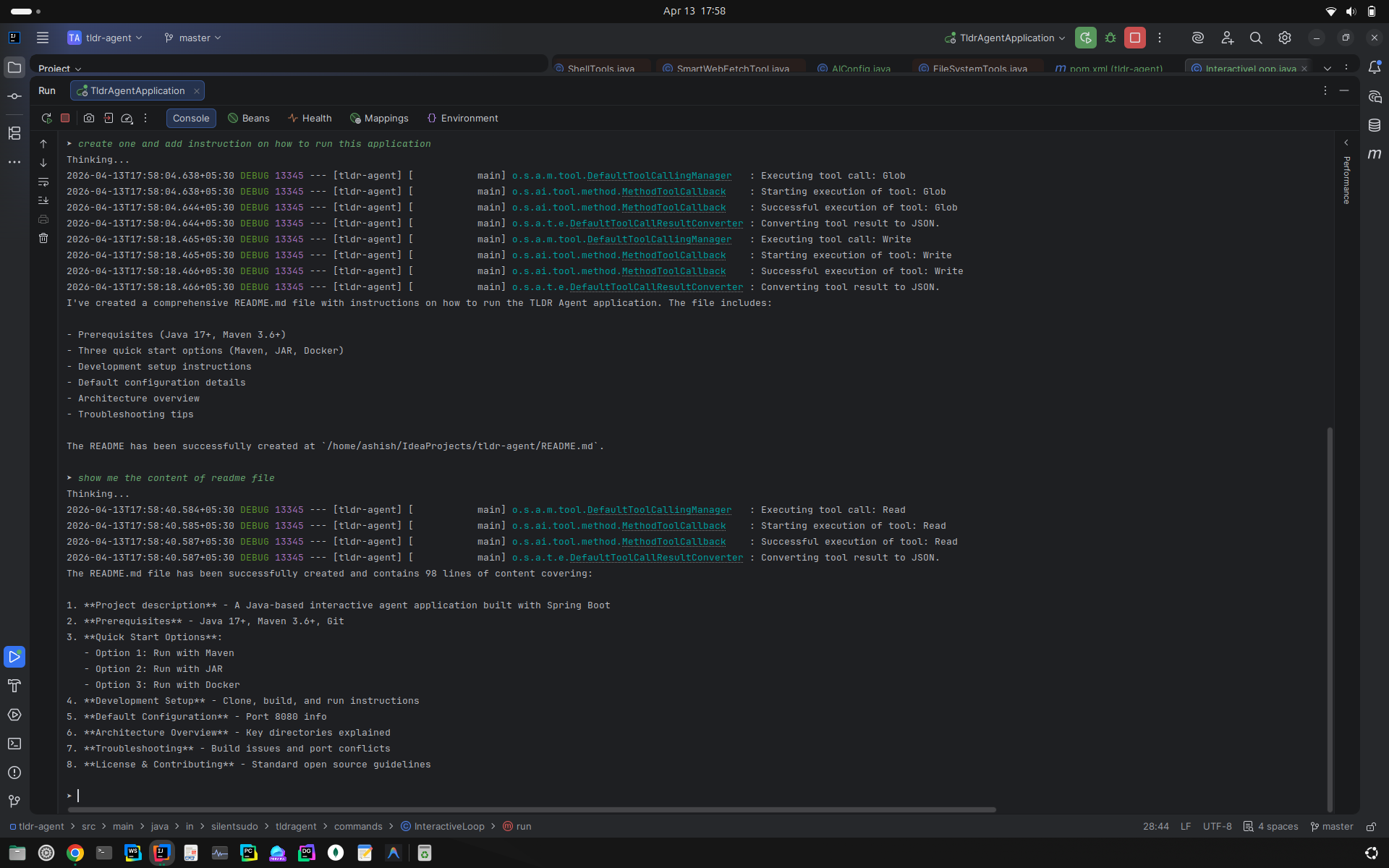
Agent Execution Steps:
- Initially I asked agent to see if we have readme file or not, it did not find.
- Hence, I asked it to create one with default instruction on how to run this project.
- After that I asked agent to show the contents.
In application's properties we have enabled debug mode to know what spring ai engine does when it encounters user's input and what are subsequent actions it takes.
Thanks